
NOTE: This process is changed as of SolidCAM 2026, If you are using 2026 or later, please use the 2nd set of instructions.
For SolidCAM 2025 and before:
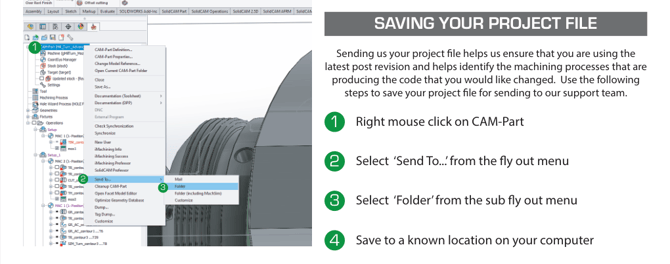
- Right-click on CAM-part in the SolidCAM / InventorCAM feature tree.
- Select 'Send To' near the bottom of the drop-down menu.
- Select 'Folder' from the second drop-down menu
- Save the file to a known, accessible location on your computer
- Attach this file to your support ticket
For SolidCAM 2026 and later:
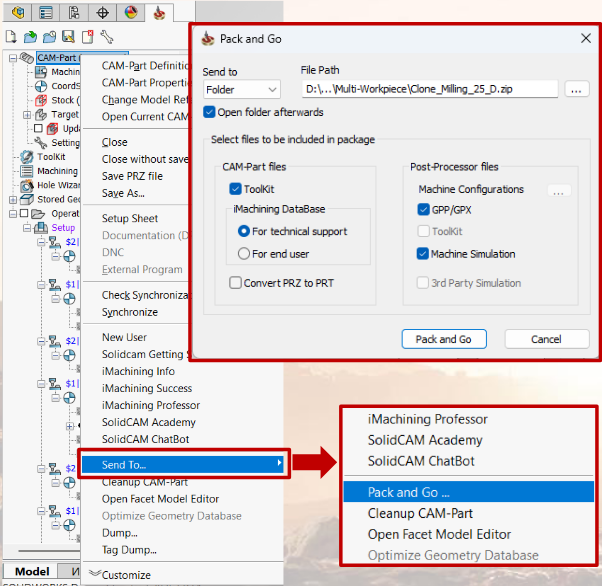
- Right-click on CAM-part in the SolidCAM / InventorCAM feature tree.
- Select 'Send To' near the bottom of the drop-down menu.
- Select 'Pack and Go'
- For technical and post support, please click select the options shown in the above screenshot (these options should save for future use):
- Under CAM-Part files select: ToolKit and For technical support
- Under Post-Processor files select GPP/GPX and Machine Simulation