Configure the server:
The server is the computer where the license is located.
- To activate your SolidCAM software license with a product key on a server, go through the following steps:
-
- Download the server activation wizard from this address: https://sentinel.solidcam.com/downloads/server_activation_wizard.zip
- Extract the zip file
- Run the file Install.bat
- When the activation client loads, insert your product key in the "Product Key" field
- Click "Activate license"
- After you have successfully activated the license, you can open the "Admin control center" that handles the licensing from here http://localhost:1947
- For help on parameters defined on the server side, see: http://localhost:1947/_int_/ACC_help_config_remote_clients.html
Configure the clients:
After you activated the license on the server, you can run SolidCAM on the client and it will find the server automatically.
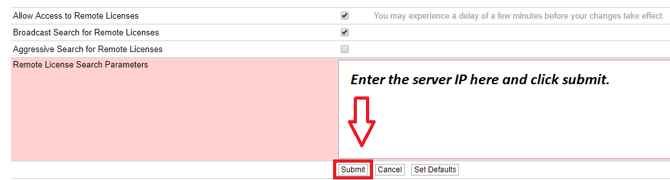
- If SolidCAM does not find the license server, you must configure the client manually. To manually configure the client, follow these steps:
-
- Open this link: http://localhost:1947/_int_/config_to.html
- Enter the server IP address in the field "Remote License Search Parameters"
- Click "Submit"